February Design Team Projects by Kristin Wilson

Hi everyone! My name is Kristin and I am going to be sharing a few projects with you today. First let me start off by saying how excited I am to be here and say thank you for making me feel so welcome. I plan on covering a few styles over the next 3 months. This month is a more CAS, clean and simple, style. I was fortunate enough to be able to play with two collections this month. Snow Day by Pink Paislee and Sweet Tooth by Bo Bunny.

The first project I have to show you was actually made from a spaghetti jar. This fun and whimsical project is perfect to do with kids and it makes an adorable gift! It’s super simple. Just check out the member’s area to see a video on how it’s made.

For this tag I used the Snow Day collection from Pink Paislee. I just fell in love with these hat & mittens die cuts. A simple bow of colored twine can make a really sweet accent.

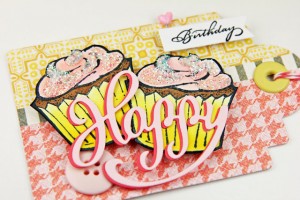
This card actually has some Sparkly Fluff from Our Craft Lounge on the cake. What a fun product to work with. To learn more about Sparkly Fluff, a how to video is available in the member’s area. This card features product from the Sweet Tooth Collection by Bo Bunny.

My style is usually more complex and I will build on that as we go into the next few months. To see some of my other projects just visit my blog at Lilsweetpea’s Place.

Video tutorials and pdf handouts are available for each of these projects on the Paper Crafter’s Library member side. If you’re not already a member of Paper Crafter’s Library, it’s worth checking out.  As a member, along with our existing video library of over 700 videos, you’ll receive daily inspiration, great project ideas, fun techniques, instruction on how to use your products, and more!  For more information and to join, click here.

Thanks for letting me share my projects with you today! I hope you’ll give them a try. I’ll see you back here next month!

Kristin's Siggy

Please Welcome New Design Team Member Kristin Wilson

Kristin Wilson

To continue with our introduction of the Design Team members, we are very pleased to introduce you to the third of our Design Team members, Kristin Wilson.

Kristin is honored to be a part of the first Paper Crafter’s Library Design Team.  She brings her passion and excitement for paper crafting to the team.  She enjoys what she does and thinks outside the box and for this reason, she will be a great member of the team.  You can see for yourself how her love for the craft shines through in her projects.  You’ll have a chance to see Kristin’s projects on Wednesday.  In the meantime, please be sure to visit Kristin’s blog: http://lilsweetpeasplace.blogspot.com/

 Learn more about Kristin:

“I am 42 and I live in NW Indiana, part of the Chicagoland area, with my husband of 14 years and our son who is 11. I am a stay at home mom and fortunate to have a schedule where I can craft everyday in my studio which my husband built for me. It is by far my most fave room in the house. I am the only girl in my family. Even the cat and dog are male. What’s wrong with this picture?”

Being the only girl in her family, Kristin loves to craft and create with all things pink and lacey. She describes her style as Shabby Chic & Eclectic but always evolving and she designs for the task at hand.

 Kristin answered a few questions for us:

 How long have you been papercrafting:

“I have been a paper crafter for 3 years. Mainly I create cards, mixed media, and altered art. If I scrapbook, it’s usually a mini album.”

Do you have any papercrafting goals or things to accomplish?:

“I have a ton of pictures stock piled that need to be scrapbooked. My ongoing goal is to get them into an album and all caught up. Someday!”

Do you have any tips for fellow members that may help jump start their creativity:

“Try something new! A new technique, color scheme, embellishment. Have something you have been wanting to try? Just do it! It’s so fun to break out of the norm. That’s when you learn more about your personal style.”

The New Face of our Makeover Monday Challenge

Happy Family Day to our Canadian friends (although I know not all provinces celebrate it) and Happy Washington’s day to all of our American friends! Today I wanted to take a minute and share with you some changes we’re making related to our Makeover Monday Challenge – it’s getting a “makeover” LOL

First off I want to thank all of you for taking the time to offer your feedback on the challenge.  It’s good to know that although many of you didn’t have the time to actually participate, you did learn from and gain inspiration from the challenge – and that it was accomplishing what it was intended to.  I love what Barb W. said about the challenge, because it really sums up what we were hoping to achieve:

So given the feedback we’ve received here, and the feedback from Facebook, we’ve decided that rather than completely, eliminating the challenge, we’re going to make some changes to it.  

First off, the concept behind Makeover Moday’s is going to remain the same –  the purpose being to help you learn how to take the ideas and inspiration you find on the internet, and make it your own. The concept of “working from your stash” is also going to stay the same.  I don’t know about you all, but I certainly find that it’s very easy to fall into buying things because they catch our eye, and then hoarding them – either because we love them too much, or we bought them for a purpose and changed our mind or used some of it, but have lots left over.  And here at Paper Crafter’s Library, we’ll all about making the most of the products you buy.

How we present, and then run Makeover Monday is going to be different though.  We’re moving the video portion of Makeover Monday’s to our Paper Crafter’s Library Email Newsletter.  So every Sunday, when we release our project ideas newsletter we’re going to show you our inspiration piece, our made over piece, and a video tutorial showing you how it was made over.  In the Sunday email you’ll receive a link to a private web page from which you can watch the video tutorial.  As with all of our other newsletter projects the video tutorial will be available for general viewing for one week only – and then will be moved into our library for our members only. So, if you don’t want to miss any of our Makeover Monday video tutorials, then please be sure you sign up for our email newsletter from the sidebar of this blog.

Then, on Monday, here on the blog, we will post the original picture, and the made over picture.  We will still have a challenge – but the prize will be awarded monthly.  So for each project you submit – you will get one entry into our monthly draw.  And then the first Monday of the month – we will announce one monthly challenge winner.

Because we are so close to the end of the month – we’ll start the new monthly challenge next Monday, Feb. 27th, and it will encompass that Monday, as well as every Monday in March.  The winner will be announced on the first Monday in April.

Any questions, please post them in the comments section of this blog, and we’ll be sure to answer them in the comments section as well.

In the meantime, the winner from last week’s Makeover Monday Challenge is……Asha! You can see her card below, and visit her blog HERE.

Congratulations Asha! Please email us at customer service@papercrafterslibrary.com to claim you prize.  Be sure to put Makeover Monday Challenge winner in the subject line!


Product Spotlight & Freebie Friday: Bo Bunny Sweet Tooth Collection…Enter to Win!

 SweetToothForBlogPost

This week’s Freebie Friday Give-Away comes from the fun Bo Bunny collection called “Sweet Tooth”. We’re giving away a set of nine 12″ x 12″ double sided patterned papers and a package of coordinating layered chipboard elements.

For today’s Freebie Friday Video Tutorial, Tracy has created this ”Sweet Girl” card using paper and elements from the Sweet Tooth Collection:

 SweetGirlCard

 Download the pdf handout here

You can watch Tracy’s video here:


In addition to the card Tracy also created this Yum scrapbook page. This project features the Sweet Tooth Collection by Bo Bunny as well as bakers twine by The Twinery.

YumScrapbookPage 

We have a video tutorial and pdf handout for the scrapbook page available to our Paper Crafter’s Library members – please make sure you are logged in first. If you’re not already a member, it’s worth checking out. As a member,along with our existing video library of over 700 videos, you’ll receive daily inspiration, great project ideas, fun techniques, instruction on how to use your products, and more! For more information and to join, click here.

And now, the winner of last week’s Red Liner Tape:

Red Liner Tape from Sunny Stampin' Store

 is………

Congratulations Betty B! Please email us at customerservice@papercrafterslibrary.com to claim your prize! Be sure to put Freebie Friday Winner in the subject line, and include your phone number and shipping address in the body of the email!

How to enter this week’s giveaway:

All you have to do is leave us a comment in the comments section of this blog. Winner will be announced on Friday, February 24th at the bottom of that Freebie Friday post!

Call for Paper Crafter’s Library Trends Reporter!

*We’ve got three posts for you today, so please be sure to scroll down to see all three*
 
One of our primary goals for the Paper Crafter’s Library Blog is to keep our readers up to date on the latest trends in the paper crafting industry and we’re looking for your help to do just that!  If you think you’d be interested in being a Paper Crafter’s Library Trends Reporter, then read below on how you can apply!
 
What we are looking for:
Paper crafters of all types and calibers. You don’t need to be on any design teams I you don’t need to create samples. We’re looking for someone who loves working with a variety of different products from a variety of different manufacturers
 
You should be comfortable on the computer and on the internet – if you already spend time browsing the internet and checking out blogs and company websites for ideas and inspiration, then this would be perfect for you! 
 
You should be comfortable with blogging – a familiarity with WordPress is helpful but not essential.  Good English writing skills are a must as you will be creating your own content for the trends acticles you’ll be sharing with our readers.
 
What will a Trends Reporter do?
Write one to two articles a month spotlighting a current trend in the paper crafting industry – this could be a color, a pattern (i.e. chevrons) or a product (baker’s twine, doilies, banners, etc). Each trend article should include a brief description of the trend, photos of that trend incorporated into a variety of different projects (you don’t have to create the projects – you’d find pictures on Pinterest, Flickr and Google Images) and then 4-6 different products each from different manufacturers that incorporate that trend.  Click HEREto see a sample of what type of article we are looking for.
 
How to apply:
Research and create a trend article focusing on ONE trend.  The article should be as outlined above. Send your article to customerservice@papercrafterslibrary.com as an attachment to an email (please do not embed the article or photos in the email itself).  You can send your attachment as an Word document or as a pdf.  In the email please include your full name, email address, phone number, location, links to your blog and other online platforms. Please also let us know any other online commitments you already have.
We will evaluate all the submitted articles – if your article is chosen to be published on the Paper Crafter’s Library  blog, it will be published under your name with links to your website.  We’ll also give your article a shout out on our Facebook Page and through Twitter.  As we have a huge readership this will give you lots of traffic and exposure!
 
We are looking for 1-2 permanent trends reporters each willing to write 2 trends articles a month.  If you are offered that position you will be eligible for additional benefits including a free Paper Crafter’s Library membership.
Paper Crafter’s Library is growing in many new and amazing ways! We would love to take you along for the ride!
 

Technique Thursday: Faux Crocodile Skin and Faux Tile

 Club52Week24Introduction

Every Thursday on Paper Crafter’s Library is Technique Thursday – it’s when we create and feature projects for our Club 52 online class (our year-long technique club), which our Paper Crafter’s Library members also access free as a benefit of their membership. We’re now on week 24, and are continuing on with embossing techniques. This week we’re learning a couple of faux techniques: faux crocodile and faux tile. For example, in the tag on the left, the background was created using the faux crocodile technique and the background for the tag on the right features the faux tile technique. 

If you’re interested in checking out what we’ve covered so far, you can look at our Club 52 page. If you’re a technique junkie and would like to learn new techniques (as many of them are ones we have created), or revisit old ones – you can still sign up from this page – you’ll be able to access all 23 weeks we’ve done so far, plus the remaining weeks, and your access to the classroom will last for 15 months.

Product Review & How-To: The Silhouette Cameo


In A Nutshell…….
(read further down for a full Review)

Good Points:
 The Silhouette Cameo is a digital cutting tool designed for the home user. It is affordable, easy to use, allows for a variety of applications, and is compact for easy storage. It works in conjunction with your computer but does not require great computer knowledge for its use. It’s doesn’t require the purchase of a cartridge, instead thousands of cuttable designs are available for individual purchase, or you can use your own fonts and outside designs.  It is a great machine, which will meet most of your crafting needs, and is backed up by a highly effective customer service which is quick to offer support.

Bad Points:
While the cutting is precise, there are some limitations to the materials you can cut with it.  It works well with paper, cardstock, vinyl, lightweight fabrics – essentially anything up to about a 0.8 mm thickness. Felts, heavier Chipboard and Grungeboard are off limits.  Finally, if you plan on crafting with ninja like stealth in the dead of night, this machine will definitely give you away with its distinctive noises.

Video Tutorial

Watch the video below to see how the Cameo compares with it’s predecessor the Silhouette SD.  You’ll also learn exactly how to set it up from taking it out of the box, to getting ready to cut with it. 

Additional videos on the Silhouette can be found here.

Our Full Review:  

The Silhouette Cameo is a digital cutting tool, marketed to the home user.   It connects to your computer through a USB port.  While it is capable of reading cut files through an SD card (thus eliminating the need for a corded connection), you will always need your computer to purchase and manipulate your images. 

So what is so great about this machine?  Well for starters, it is affordable.  You have a one time fee for your machine (which is less than many of the bigger digital cutters out there), and then you can cut away.  The parts are inexpensive when you consider that the mats and blades will last for a hundred cuts or more.  It is compact, which can be a real bonus if you are limited in space.  I have other machines, but I find it easier most of the time to just to pull out my Cameo which hooks up in seconds, and is small enough to stay on my desk for periods of time. 

Next, the basic software for manipulating your images is free, and with it, you can access the ever growing online store which contains thousands of images which can be bought individually. That means there are no $50.00 cartridges where you may get images you do not want.  The software is so easy to use, that you can begin cutting and manipulating images within a matter of minutes.  If you don’t find what you are looking for in the store, then you also have the freedom to import graphic images into your Silhouette Software, and print them, layer them, and cut them.

Oh, didn’t I mention that?  Well the Cameo is fitted with an optic eye, which reads registration marks which you print onto your paper, and cuts the images in relation to these marks.  I have personally found these cuts to be extremely accurate, and from what I have found of other reviewers, it has been found by others to be one of the most accurate on the market (reviews can be seen on Amazon and throughout the web).  If all this was not enough, Silhouette has created a whole line of products which are designed to work with your machine, and expand your crafting repetoire.  From home decorator and fashionista, all the way down to the humble crafter and rushed school project maker, this will be the machine which can take you to a one way trip of creativity and fun.

Silhouette Online Store:
The Silhouette online store is the place to go when you want to buy single designs which will automatically download onto your Silhouette Studio Library.  Thousands of images are available for the low cost of .99 cents on average (this does not include liscensed designs).  A variety of subscription options are available which will reduce this cost to a fraction of the amount.  The library is constantly being updated on a daily basis (Monday to Friday) with a variety of seasonal and all purpose images.  Silhouette works hard to come up and team up with some great designers.  You will find images by: Hero Arts, S-E-I, Scrap n’ Fonts, Donna Downy, Echo Park, as well as various independent designers.  On top of this you will find licensed images of Peter Rabbit, Olivia, MR and MRS. and much more.  Purchases are for individual images or mini collections.  Files are all high quality, and easy to use.

Silhouette Studio Software (Free) & Designer Edition Software ($49.99)
For every owner of the Silhouette, there is the availability of free software for working your images.  This software gives you access to the store, creates a library of your purchased images, and gives you the freedom to manipulate your images in a variety of ways.  For instance, you can use and cut every font on your computer so you will never need to buy another font (unless there is an amazing one that you can’t live without).  With the free software, you can also import a variety of file types onto your mat from outside sources.  That means importing DFX files (which Silhouette saves in), JPEG and many others.  So feel free to let your creativity soar as you import a variety of patterns and images for the print and cut, purchasing DFX cut files, or creating your own images to import from Adobe Photoshop. You can watch a free 2-part video HERE on how to use the Silhouette Studio Software.

Now if you want to do even more, there is a paid upgrade to your software, called Silhouette Studio Designer Edition Software.  This is the regular software on steroids.  With this upgrade, you can now import SVG files directly into your software for easy manipulation and cutting (this means no lengthy conversions for files you may already own).  Also you have some fantastic new creative knife tools which will allow you to clip designs using a variety of cut patterns.  There is a wonderful new sketch tool which allows you to turn cut images into sketches with a variety of lines and fills, a rhinestone tool to turn your patterns into rhinestone designs for your clothing, a built in ruler and guide lines to make your personal creations easier to manipulate, and finally an enhanced eraser set to modify designs with more precision!  If you like freedom to create without borders, then this upgrade will definitely fulfill your needs.

Products to expand the use of your Silhouette:
Silhouette has designed a varied product line which allows you to utilize your machine to its full potential, and take your crafting to a whole new level!  All of the following pictures came from the Silhouette Blog, and the artists which post there. 

Sewable Fabric interfacing and Clean Cut Fabric Interfacing:

The Sewable Interfacing has a thinner adhesive which allows you to temporarily iron your fabric on, and then cut it in your machine.  Once cut the fused fabric/interfacing can then be temporarily ironed on to your project for ease of sewing.  This product sells for $7.99 and offers 17″ x 36″ of interfacing.

Clean cut is designed for cutting intricate patterns out of your fabric for use in projects where you will be ironing the cut down (as in for cards or scrapbook pages) or for designs which you will be hand stitching (if you need to wash the item as in for canvas bags).  It is not a product designed for use in a sewing machine.  The suggested retail price for this product is $7.99 USD and it offers 17″ x 36″ of interfacing.

Heat Transfer Material:

This product is used for creating smooth or flocked images on fabric.  It comes in a variety of colors , two textures, and is easy to use.  You will find that each roll lasts for a long time. The Smooth is available in 20 colors.  The size for each roll is 9″ x 36″ and retails for $14.99 USD each.  The Fuzzy is available in 12 colors, is 9″ x 36″, and retails for $14.99 USD each.

 Printable Heat Transfer:

Printable heat transfer is available in two options, one for light fabrics, and one for dark fabrics.  The light fabric material retails for $9.99 USD and comes with five 8 1/2″ x 11″ pieces.  The dark retails for $14.99 and comes with the same quantity as the light.  With these products, you are able to print your favorite digital image from your Silhouette Studio Software, cut it to size on your machine, and then iron the image onto fabric to create some unique fashion pieces.

Adhesive Vinyl:

Adhesive vinyl comes in two weights, Premium and Standard.  There is a 9″ x 10 ft and 12″ x 6 ft, the color selection differs slightly between the 9″ and 12″ widths, and between the Premium and Standard. The Frosted Glass Vinyl is available only in the Premium 9″ width, and is 4 ft long.

The Premium Vinyl is an extra durable vinyl designed for projects which may go through a more rugged use.  Outdoors on cars or windows, along with pieces which may be handled a lot are the primary uses for this vinyl. It retails for the price of $14.99 USD per color.

The Standard Vinyl is designed for everyday projects with little chance of wear, such as wall art, mirror art and so on.  It retails for $7.99 USD

Fabric Ink:

One of the new products released in the Summer 2011 is their fabulous Fabric Ink.  These inks are desinged to be used with the stencil vinyl.  The idea is that you cut out the design on the stencil material, and then spead the ink inside the stencil lines (one color at a time) to produce your own custome designs.  The colors are available in 10 colors, with the option of mixing your own colors using the Cyan, Magenta, and Yellow, or with the addition of the black and white.  While you could always use alternative fabric paints on the market, I enjoy the fact that you can find all the products in one place and can be assured of the quality.  Each ink tube retails for $8.99 USD and the transfer vinyl which gives you 3 ft of clear vinyl material, and 3 ft of transfer tape for the price of $14.99USD

Rhinestones:

Silhouettes Rhinestones are made with a heat transfer backing, making them perfect for all your craft projects.  Cards, scrapbooking, home decor or apparel, you will be able to find many uses for these great jewels.  They come in 10 colors and three sizes for each color all with enough gems for each project. Each package retails for $6.99 USD.  Along with the rhinestones you will find transfer tape and template kits for easy application.  There are a great variety of rhinestone templates in the Online store, and with the purchase of the Silhouette Studio Designer Software, you will be able to create your own!

Sketch Pens:

How great is it to have a machine that can cut a whole variety of fun materials, into a whole variety of fun shapes.  But wouldn’t it also be great to have a machine which could sketch out a whole variety of shapes?  Well with the addition of these sketch pens, you can!  Three sets are available, one glitter set of 4 pens, one metallic set of  4 pens, and one starter set of 8 different colors of pens.  Each of these sets retails for $9.99 USD, and each of these sets will turn out a beautiful image.  The online store contains a variety of images which are in sketch format, or with the purchase of the Silhouette Studio Designer Software, you can turn any cut file into a personalized sketch image of your own.

Magnet Paper:

Printable magnet paper allows you to turn a host of images into a one of a kind personalized magnet!  Each pack contains 4 sheets of 8 1/2″ x 11″ media.  Retail price is $9.99 USD

Tattoo Paper:

How many times have your kids begged you for one of those nifty fake tattoo’s?  I know my kids love them, and beg me not to wash it off (even days later lol) .  Well, now you can have them when you want, the way you want.  Mustaches, trucks, hearts or skulls, whatever you want, you can have, in fun tattoo format.  Each sheet contain two 8 1/2″ x 11″  printable tattoo sheets, and retails for $9.99 USD.

Etch All:

Glass etching?  Not a problem with your Silhouette, and their Etch All creme or Dip and Etch.  Simply cut out the stencil of words or images in your Silhouette, and use the cream or dip liquid to create the etching.  A Elegant look for any class or mirror gift.  Available in a variety of sizes, and prices.

Final Thoughts:

When all is said and done, the Silhouette is probably one of the most versatile and cost effective machines out there, and in the end it , IS, that darn good!!  It works the way it should, has few hick-ups, and is probably one of my favorite machines out there.   

If you have used the Cameo and have any feedback on how you liked it, please leave your review below.


February Design Team Projects by Ezlie Perez

Hello there! I’m so happy to be here as a design team member. I hope you are inspired by the projects I’ve made for you.  

My first project is a window card featuring the die cuts from the Snow Day collection from Pink Paislee. These snowmen icons I thought were so cute, that I had to use them. Making a window card is fun and easy, I hope you give it a try.
DesignTeamSnowDayWindowCard

My next project is a 12×12 scrapbook layout that highlights the Sweet Tooth collection from Bo Bunny. I had the perfect photos to go with this collection, pictures of my daughter when we baked gingerbread cookies for the first time. I was able to stamp and add paint to this layout, in addition to my favorite embellishments – twine and buttons.

DesignTeamGingerbreadCookiesLayout

My third project was a 4×6 recipe book. This is such a simple project when using the journaling cards already sized on the Sweet Tooth designer paper. This book could make a nice gift too.

DesignTeamRecipeBook

My final project is another card featuring those darling snowmen again. These snowmen are dimensional accents, which I love. They had some shimmer in them as well as dimension. With a bit of stamping and sponging, this card came together quite quickly. It was fun making a snowy background scene for these snowmen.

DesignTeamYouBrightenMyDay

Video tutorials and pdf handouts are available for each of these projects on the Paper Crafter’s Library member side. If you’re not already a member of Paper Crafter’s Library, it’s worth checking out.  As a member, along with our existing video library of over 700 videos, you’ll receive daily inspiration, great project ideas, fun techniques, instruction on how to use your products, and more!  For more information and to join, click here.

I hope you’ve enjoyed these projects. For more project inspiration please visit my blog: Made by Ejp. I’ll see you next month! Happy creating!


Please Welcome New Design Team Member Ezlie Perez

Ezlie PerezTo continue with our introduction of the Design Team members, we are very pleased to introduce you to the second of our Design Team members, Ezlie Perez. Ezlie is very excited to be a part of the first ever Paper Crafter’s Library Design Team!

Ezlie brings her love of papercrafting along with her clean and simple style to our team. She enjoys stamping and tries to utilize it in every project she does.  She thrives with challenges and for this reason we think she will excel within our team.  You will see for yourself that she loves the hobby and everything it allows her to create.  You’ll have a chance to see Ezlie’s projects tomorrow.  In the meantime, please be sure to visit Ezlie’s blog: http://madebyejp.blogspot.com/ 

Learn more about Ezlie:

“She is 30 years old and lives in California. She is happily married with two children ages 10 & 8. Ezlie works full time as a design drafter, drawing blueprints for a construction company. She stamps and scrapbooks any free moment she gets, mostly after the kids are asleep.

She describes her style as clean and simple: “I like texture and details with clean design lines. I really like all sorts of design styles but clean and simple comes easiest for me. I have a passion for this hobby and I love teaching others. I look forward to sharing my creations and I hope to inspire you.”

Ezlie’s favorite papercrafting is scrapbooking.  “I like telling the stories of my family and having a nice way to showcase them.  With the larger work space I get to be more creative in designing the layout and how to fill in the space available. I also like that the pretty papers get to be showcased on a larger scale too.”

Her advice for anyone out there in need of advice to get their creativity flowing would be to “never give up, continue learning, and try new things.  I’m always on the look out for new ideas and products that may spark a creative boost.  Trying new things is a big one, as you’ll never really know if you like something or if it fits your style if you don’t give it a try.  I enjoy blog surfing and You Tube surfing where there is so many talented crafters that share ideas freely.  I tap into those resources daily!”

Makeover Monday Challenge # 14: Inspired by Deanna Misner…our last Makeover Monday Challenge

 LifeIsAWalkInThePark

Welcome to our last Makeover Monday challenge – a weekly challenge brought to you by the Paper Crafter’s Library and Sunny Stampin’ Studios. The purpose of Makeover Monday is to help you learn how to take the ideas and inspiration you find on the internet, and make it your own. This challenge is strictly a “work from your stash” challenge.

Yep!  You did read that correctly.  When we launched our Makeover Monday challenge 3 1/2 months ago – we had high hopes for this challenge.  After all, in our emails, people would consistently be asking us HOW we came up with our ideas, and WHERE we went for inspiration. That is where the concept for this challenge was born. Unfortunately, the participation has been disappointing, which is why we’ve decided to discontinue this particular challenge.  

We’re at a cross roads right now, trying to figure out whether or not to continue on with any type of challenge – is challenges something you guys want? If yes, what type of challenges would you like to see?  Please take a minute to answer our question in the comments section of this post so that we can decide whether or not there is any value in trying a different type of challenge.

Our last inspiration piece, shown below, is from Deanna Misner- a paper crafter whose blog we recently discovered.  

DeannaMisnerBabyBoyCard

You can watch Tracy re-create the page using elements from our stash here at the Sunny Stampin’ Studio:


Here are the details on how you can participate in the Makeover Monday Challenge:

A new Makeover Monday Challenge & video will go up every Monday

  • Work from your own stash to create a project based on the inspiration project provided – you can use any products you would like, and make any type of project you like – card, scrapbook page, album, 3D item etc.
  • Post your project on your blog, in your gallery or on any other photo-hosting site (such as photobucket or flickr).
  • Click on our inLinkz button below to add a link to your project for our challenge
  • You will have until 7am, Monday, February 20th, to add your link to the list to be eligible to win. And you can enter as many times as you like.
  • One randomly selected winner will be chosen from ALL the entries on Monday, February 20th.
  • The winner will be posted here. The randomly selected winner will win a grab bag filled with over $30 of spring-themed goodies.

Good luck to everyone and we look forward to seeing your projects!

Now before I go, it’s time to annouce the winner of last week’s Makeover Monday challenge……

But before I do, I want to thank everyone who participated, and encourage you to keep it up – it’s a fun way to develop your creative skills, and as our winner is randomly drawn – everyone has a chance to be a winner…

So…..Heidi…..you are this week’s winner. You can see Heidi’s card below, and visit her blog HERE.

MakeoverMondayWinnerFeb13

Heidi, please email us at customerservice@papercrafterslibrary.com to claim your prize. Be sure to put “Makeover Monday Winner” in the subject line, and in the body of the email please include your shipping address, email, and phone number.

That’s it for today.  Please take a minute to give us your feedback on whether or not you’d like to see a different type of challenge, and if yes what.  In the mean time, I’d like to extend a huge thank you to those of you that have taken the time to participate over the last 3 1/2 months!